Julien-Manici.com Language : French | English

WIFI Remote Access for Windows Mobile 6.x / Windows Phone

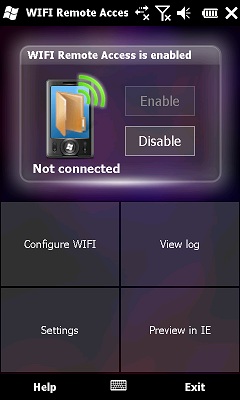
Browse the content of your Windows Phone 6.5 or Windows Mobile 6.0, 6.1 device from your computer's web browser using a WIFI connection without installing anything on your computer! Compatible with Windows Mobile Professional devices (with touchscreen) and Windows Mobile Standard devices (without touchscreen).

WIFI Remote Access Basic


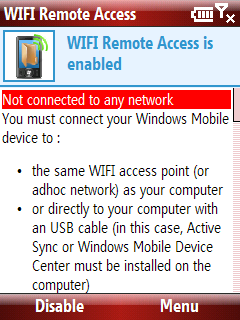
WIFI Remote Access running on Windows Mobile Standard


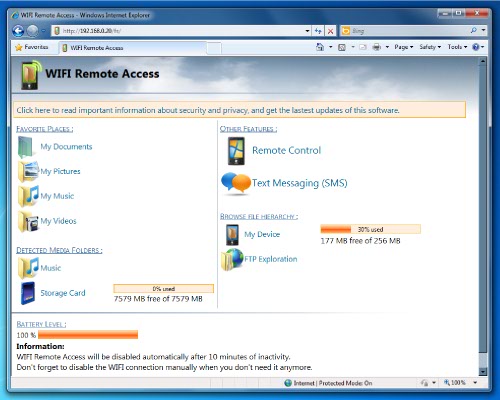
This free application will allow you to explore the content of your Windows Phone directly from your computer, through a WIFI connection without installing any client software on the computer! All you need is to open your web browser, and type the IP address of your phone (which is displayed on your phone screen). You will then be able to browse your data, pictures, and music and send files from your computer to your device. You can see pictures and listen music on your computer directly from the web interface.

It also features a registry editor, for people who like to tweak their Windows Mobile device.

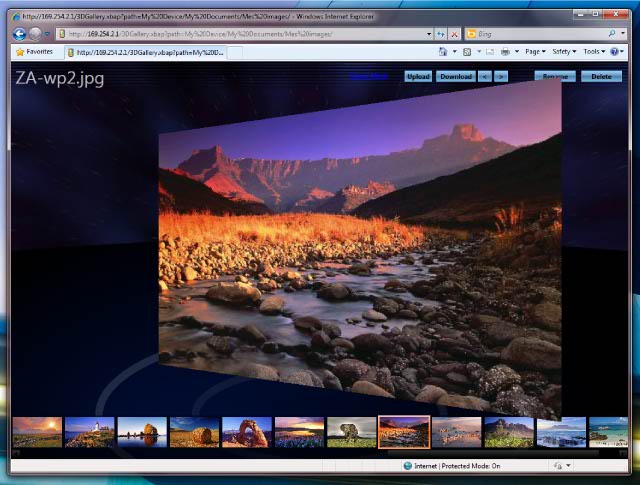
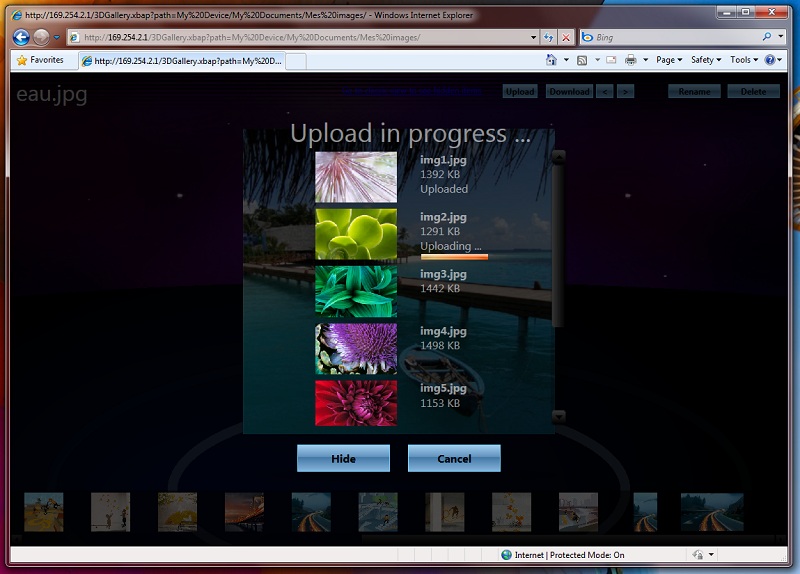
Internet Explorer (6, 7 or 8) users on Windows XP or Vista (with .net framework 3.5 sp1 installed) or Windows 7 (.net framework 3.5 sp1 already included) will be able to browse their pictures from a 3D XBAP (XAML Browser Application) / WPF (Windows Presentation Foundation) based user interface (as seen on the screenshots below). They will also be able to upload multiple files at once through this interface.

How to download WIFI Remote Access Basic 1.7r4 for free?

Start the Marketplace application from the start menu of your Windows Phone 6.5 (if you use Windows Mobile 6.0 or 6.1, you must install the Marketplace application from the Microsoft website), and then go to the "Communication" category, and download WIFI Remote Access Basic 1.7r4.
If you don't see WIFI Remote Access in the listing, click on menu, settings, and choose the "United State - English" region in the Marketplace settings.


WIFI Remote Access Premium


WIFI Remote Access Premium 1.7r4 is now available on Windows Phone Marketplace for 7.99$
WIFI Remote Access Premium 1.7r4 includes all the features of WIFI Remote Access Basic, plus the following features :
  • FTP protocol support, making easier to exchange files and folders between your computer and your Windows Phone
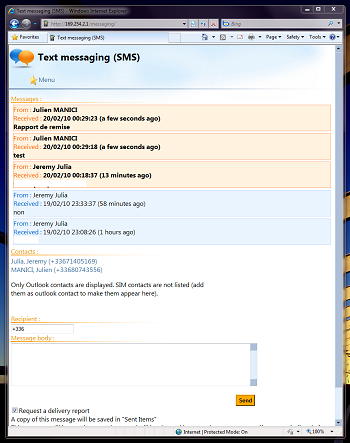
  • Text messaging (SMS)
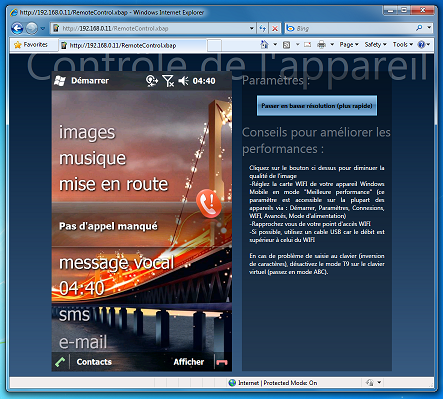
  • Remote control of your device (with the ability to use the computer keyboard to type text, and take screenshots)


Changelog:
Version 1.7r4 : (2010/06/14)
-minor changes and bug fixes : changed the background picture on logon screen and WPF gallery (IE only), ...


Version 1.7r3 : (2010/06/01)

-minor bug fixes
-removed the expiration date


Version 1.7r2 beta2 : (2010/05/26)

-this beta version has a timebomb which will make it expire on 2010/06/01
-now compatible with Windows Mobile Standard (non-touchscreen devices)
-may also be compatible with any Windows CE device (untested)
-remote control : better compatibility with Internet Explorer 6
-FTP server : solved compatibility issues with Firefox, Chrome and some other FTP clients
-added an option to automatically accept any incoming connection without any prompt (less secure)


Version 1.7r2 beta1 : (2010/05/08)

-new feature: FTP server (tested with IE/Windows Explorer and FileZilla; please test it with your favorite FTP client and report bugs. Make sure you have backups of your files before using it)
-various bug fixes (i.e: the SMS feature now accepts phone numbers containing a space, ...)
-minor visual changes in the web interface
-added the ability to translate the WPF-based components (Remote control and 3D Gallery)

WIFI Remote Access

580 comments - Add a comment

Download

Translations available :

LanguageAvailabilityAuthor
EnglishIncludedJulien MANICI
FrenchIncludedJulien MANICI
Chinese (simplified)Manual update任鹏
CzechManual updatePerník
DanishManual updateRatzai Yaghoub
DutchManual updateThanks to Sanity & Timothy and Daman Brett who both sent me a translation
GermanManual updateThanks to Dennis Nolte, Morpheus, Technobrain and Starbase64 who all sent me a translation
GreekManual updateBernikolas Marios
HungarianManual updateGidano
ItalianManual updateThanks to Mirco Carraro and Umberto d'Agnone who both sent me a translation
KoreanManual updateJeongsik Yu.
PolishManual updateJurek Pilniewicz
PortugueseManual updateJorge Vila
RomanianManual updateflorin7franky (on XDA-Developers)
RussianManual updateВадим Богайсков
SlovenianManual updateJurcek
SpanishManual updateJorge Vila

If your language is not listed here, feel free to contribute by sending me your own translation (you just have to edit the "en" file in "\program files\WIFI Remote Access\res\languages\")

Note that some translations are very outdated and no longer maintained by their original author, thus some parts of the application may not be fully translated in your language. If this is the case with your language, you can update the existing translation file and send it to me so that other users will be able to use a fully translated application.


Support WIFI Remote Access development :

If you like this application, you can now donate via Paypal :


Comments about WIFI Remote Access for Windows Mobile

Name :
Email (will be kept private) :
Comment :

Posted by Jürgen Kliegl on 2010/09/02 13:27
Bonjour Julien,

I enjoy your program which I bought at marketplace.
But I didn't find the promised registry-editor.
what I'm missing?

Greetings
Jürgen
Reply
Posted by Julien MANICI on 2010/09/04 22:24
Thank you for buying my app.
On the application main screen, click on Settings, and check the "enable access to registry editor" checkbox.
The link to the registry editor will now be displayed on the main menu of the web interface.
Reply
Posted by fred2 on 2010/09/01 18:07
Bonjour Julien,
Merci pour ce superbe soft et les extraordinaires horizons qu\'il ouvre.
Pourriez vous préciser un point.
Je n\'ai aucun problème pour accéder à mon Smartphone lorsque celui-ci est connecté en Wifi sur le même Réseau que mon PC...
Par contre, la page reste blanche lorsque j\'essseye un Réseau différent (Smartphone= Réseau A borne Wifi; PC=Réseau B ).
Pourtant, le Smartphone demande bien la confirmation \"autorisation connection entrante\".
Donc, est il possible d\'utiliser Wifi Remote Access sur 2 réseaux?
merci
Reply
Posted by Jackolucky on 2010/08/31 10:50
Bonjour Julien,
Remote access Premium: I bought it through Marketplace, well done, it\'s a great tool! In your page about WIFI Remote Access security you wrote: \"However, there is no security risk if you use an USB connection.\" I am trying to connect via USB connection but I can\'t figure out how. Could you please tell me how I can connect Remote Access using a USB Cable?
Reply
Posted by PocketControl on 2010/08/30 03:09
Bonjour Julien,

Fantastique ton logiciel, de loin le meilleur trouvé. J\'aimerais savoir comment configurer ma connection dans FileZilla pour transférer mes fichiers.

Merci pour ce beau travail.
Richard.
Reply
Posted by Projekt SHIN on 2010/08/28 08:36
This is a great little Application... I use it all the time for texting... because I type LONG messages to my girlfriend and my hTC HD2 keyboard totally sucks.. so it's great being able to utilize a computer keyboard for text... and that function alone is a complete side feature! lol.. i use it for transferring files between my comp and laptop etc.. when a wire is unavailable.. I also use it to edit my registry.. however you flip it.. whatever you use it for the most.. this is a great App and well worth the 8 bucks or however much it was that i paid... stop being cheap.. if you can't afford it.. then you sir.. simply failed... at life
Reply
New

Show all other comments ...